For Property Owners

Turn ordinary apartments into a source of maximum income and free time.

🚀 Get in touch
For Property Owners

Guests spend money in the city, not with you

Your guests spend thousands on tours, transfers and spa services, but that money goes to outside companies. You receive only the rent, although you could earn more from every guest.

A concierge service right inside the apartment

The guest scans a QR code in the apartment and opens a catalogue of vetted services. You receive 10% commission from every order without doing extra work.

Your key benefits

💸

Turnkey passive income

Place a QR code in the apartment and forget it. 10% from every guest service comes to your account.

📋

Fixed subscription

A clear monthly fee with no percentage from rent. Your budget stays predictable.

📈

Higher asset value

An apartment with boutique-hotel-level service rents faster and at a better price.

🤝

Completely hassle-free

Provider checks, guest support and disputes are handled on our side.

10-15 hours less routine

Guests find services themselves, without calls about where and how to order.

Higher ratings and repeat bookings

Five-star-hotel-level service lifts reviews and guest returns.

What you get

A short overview. Click an item to open the detailed section below.

A digital guest guide instead of endless chats

Guests get check-in, key, Wi-Fi, appliance, parking and house-rule instructions by QR code.

Read more

Guests settle in faster

The page shows not only the property, but also nearby landmarks: beaches, pharmacies, shops, bars, cafes, parking and transport.

Read more

A local neighbourhood guide inside the apartment page

The owner prepares trusted recommendations in advance so guests can feel oriented from the first hours.

Read more

Multilingual support for international guests

Guests see rules, instructions, local infrastructure and services in a language they understand, without manual duplicate versions.

Read more

QR code as the single entry point

Guests open the page for their exact property right away, without an app, email search or scrolling through messages.

Read more

Useful external services connected

Transfers, tours, car or scooter rental, boat trips, cleaning, babysitting, massage and delivery in one showcase.

Read more

The owner controls the showcase

You can show only suitable providers and offers that match the format of the property.

Read more

Reviews help guests choose services

Registered guests can leave reviews, and new guests can read the experience of people who already ordered the service.

Read more

Transparent commission tracking

The system shows where an order came from, what was paid and which commission should be included in reconciliation with the provider.

Read more

Money does not pass through the platform

Payments go directly between guest and provider, while the platform only helps with tracking and draft documents.

Read more

Convenient for several properties and management companies

Access can be separated: who edits information, who manages QR codes and who works with services.

Read more

Guest behaviour analytics

You can see which blocks guests open, which services they view, where QR codes perform poorly and what guests really care about.

Read more

Data-based guest experience improvements

If guests often open beaches, improve the routes. If they order transfers, add similar services. If a QR code is ignored, move it.

Read more

Fast updates

When rules, parking, instructions or recommendations change, the owner updates the text in the dashboard without new PDFs.

Read more

Ready to join?

Call us right now +382 68 506 581

or fill in the form, we will get back to you within one business day.

How it works for apartments

A detailed section-by-section breakdown.

Registration and apartment page

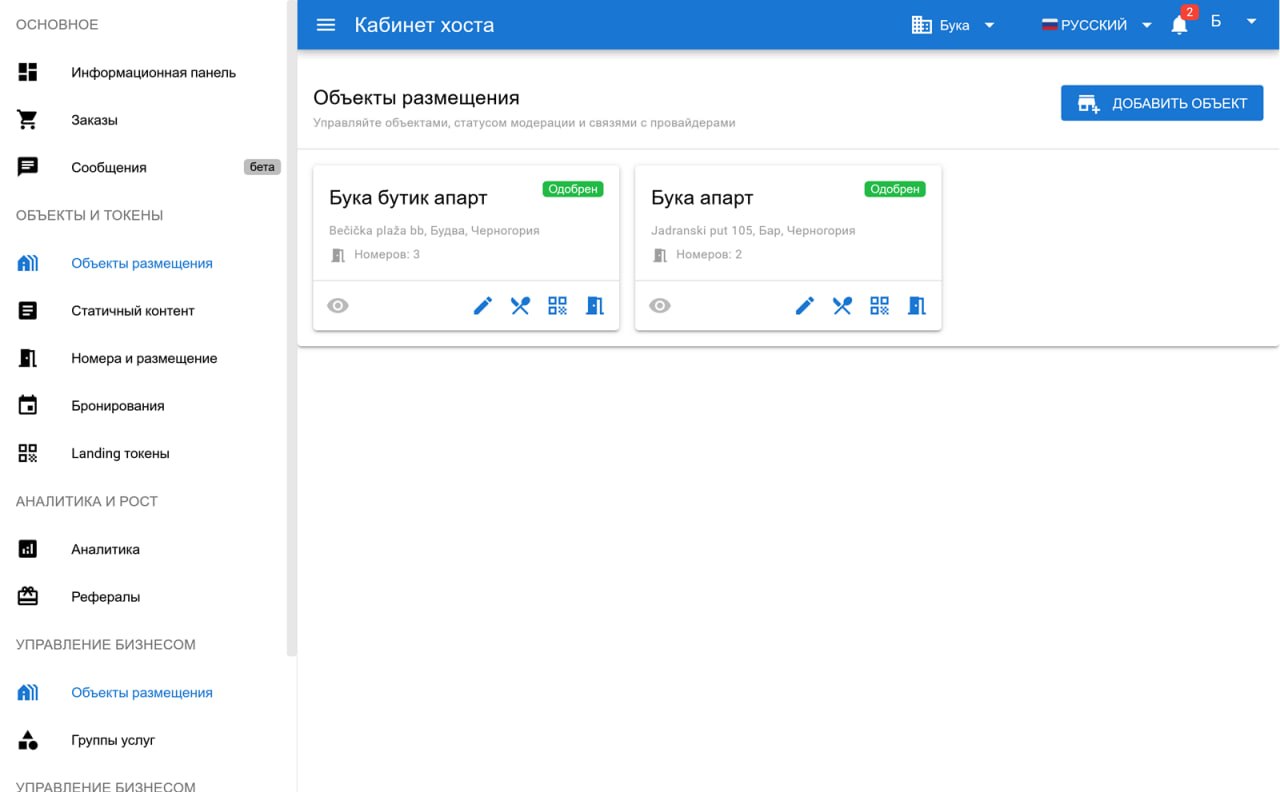
Getting started is simple: create a business account, add one or several accommodation objects and build a digital apartment page for guests.

For the guest, this page becomes a clear entry point to everything they need during the stay. The apartment page can use your brand colours, logo or name, photos of a nearby beach or other landmarks that help guests get oriented faster.

Write text blocks in your native language; the system helps prepare translations into other languages. You can always review and adjust the translation before showing it to people.

Add rooms or premises to the system, and the system will generate QR codes for them. By scanning the QR code in the apartment, the guest sees the page for exactly that property, while analytics shows which QR codes receive too few visits and may be placed badly.

Guests do not need to search messages or ask the same questions before arrival: all important information is available by QR code.

Already at this stage, you have a working information page that reduces repeated questions and makes the stay calmer and clearer for the guest.
Registration and apartment page

Stay information

Apartments usually have no reception desk or permanent staff on site, so it is especially important to give guests all practical information in advance.

The platform helps structure everyday instructions: how to enter the apartment, where to get the keys, how to use appliances, where meters are located, how to turn on the air conditioner, where to throw away garbage and what to do if water or electricity is cut off.

This page works as a digital guest memo. It does not get lost in messengers, is available at any time and helps guests solve simple questions without waiting for the owner or manager to reply.

If you need to publish or change instructions or rules, the text can be quickly updated in the dashboard. There is no need to reprint instructions or manually send guests new files.

Nearby infrastructure

For apartment guests, the apartment itself is only part of the stay. What is nearby matters too. The platform lets you turn the property page into a small local guide to the neighbourhood.

The page can explain where to find the nearest beaches, pharmacies, grocery stores, bakeries, bars, cafes, restaurants, ATMs, parking areas, transport stops, playgrounds, walking areas and other useful places.

Guests understand faster where to buy food, where to have coffee, which beach is closer, where to buy medicine or where to turn in an emergency.

Instead of long explanations in chat, the owner can prepare trusted recommendations in advance and present them neatly. This makes the stay more convenient and makes the attitude toward the guest look more professional and attentive.

External services for guests

Connect offers from external providers: transfers, tours, car or scooter rental, boat trips, food delivery, cleaning, babysitting, massage or other services that may be useful to guests.

In the dashboard you can see providers whose coverage area includes your apartment, and the owner or manager chooses which offers to show on the apartment page.

Build a relevant showcase without random services: connect suitable partners, take personal agreements into account and show guests only offers that truly match the apartment format and guest expectations.

For the guest, this looks like a convenient continuation of the apartment page: they open the QR code and see not only stay instructions, but also useful nearby services.

Multilingual support and translation

Apartment guests often arrive from different countries, and it is important that they quickly understand basic rules without extra clarification. The platform helps show instructions, infrastructure descriptions, services, prices and restrictions in the guest interface language.

You fill in content in a convenient language, and the system helps prepare the translation. This is especially useful for check-in rules, household instructions, neighbourhood information, emergency contacts and descriptions of external services.

The language is detected from device settings or selected in the interface. The owner works in their dashboard, the provider enters data in their own language, and the guest sees the page and offers in a format they understand.

For example, if a service description is entered in Serbian and a guest opens the page with English settings, the system prepares and shows the description in English. The language can be changed manually if needed.

Service card

A service card helps guests quickly understand whether a service is suitable for them. It can show a description, photo, price, restrictions, service language, number of participants, available dates and time.

This reduces unnecessary questions: the guest sees the terms in advance, and the provider receives a better-quality request.

The full list of selected offers and recommendations remains available to guests. The system helps arrange the information so that the apartment page looks clear and tidy.

Registered guests can also leave reviews for individual services. New guests can read impressions from people who ordered the service earlier and make a more confident decision.

Payment and commission tracking

The platform does not accept or hold payments for services. The guest pays the provider directly using the method agreed between the parties.

At the same time, the system keeps records: which orders were made, which of them were paid, where the order came from and which commission amount should be included in reconciliation between the apartment owner and the provider.

Commission is counted only after the provider marks the order as actually paid. Once a month, the system can generate a draft invoice based on paid orders.

The apartment owner and provider independently check the data, confirm it and send the final document to each other.

For the owner, this is a convenient model: settlements do not depend on the platform, money does not pass through it, and the order and commission history remains transparent.

Flexible agreements with providers

Apartments can become a clear sales channel for providers. The provider sees which properties bring guests, and the owner can negotiate individual cooperation terms.

The system helps track these agreements without manual spreadsheets: it shows where the order came from, what amount was paid and which commission should be considered during reconciliation.

With active and high-quality partners, you can agree on an individual commission, priority cooperation or exclusivity for specific service categories. The platform does not set service prices or impose commercial terms; it provides a technical tool for tracking agreements.

Orders and statuses

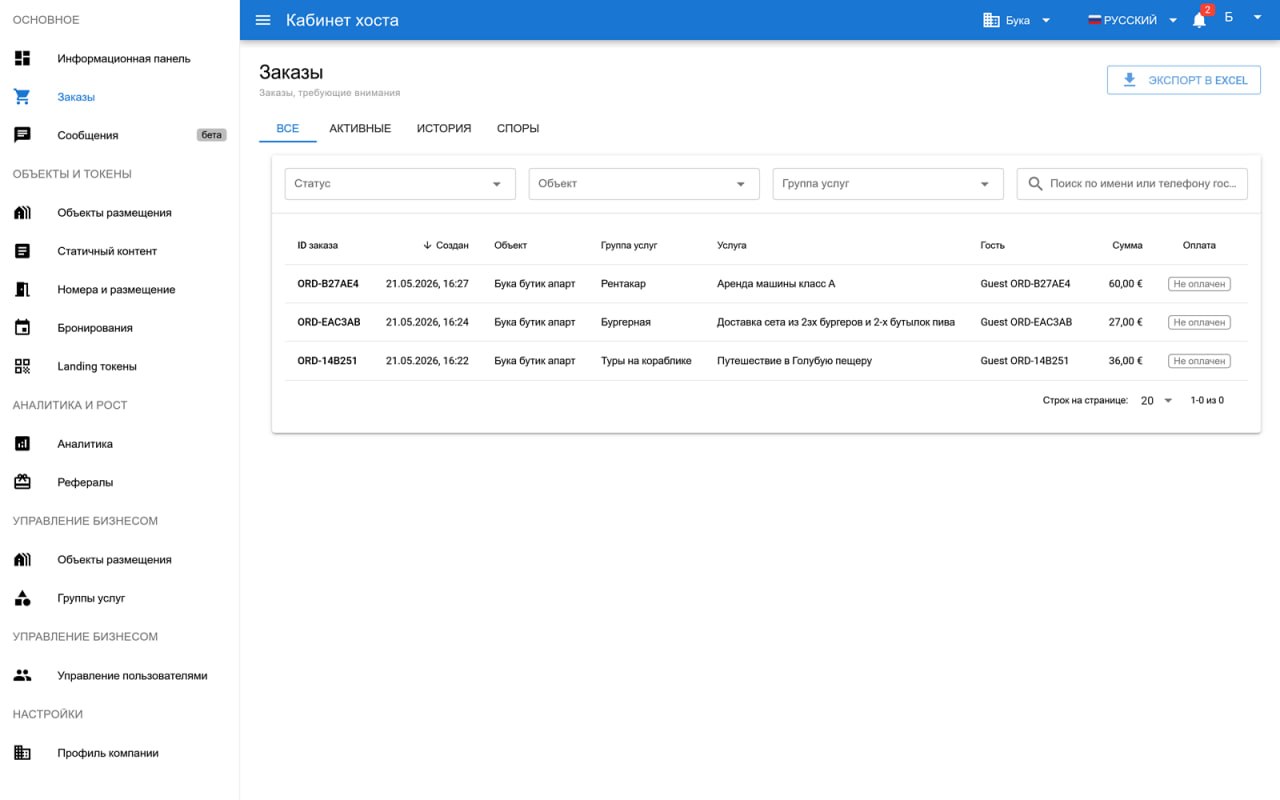
All requests are collected in one section. In Orders you can see what the guest chose, which property the request came from and what stage it is at.

Statuses help avoid losing requests and show the real picture: new, confirmed, completed, cancelled or paid. The paid status is the one used for monthly commission calculation.

For the owner, this is more than a list of requests. It is a working panel that shows guest interest, helps evaluate provider performance and allows timely adjustments to the offer showcase.

Orders and statuses

Requests and disputes

If a question appears around an order, it does not get lost in chats. The platform records the request, helps pass it to the right participants and keeps the event history.

The parties resolve the situation directly, while the system keeps a transparent trail: what was ordered, which terms were stated and what actions happened around the order. The platform is not a party to the service contract and does not decide the dispute on the merits for the guest, apartment owner or provider.

If multiple complaints appear against a provider, platform rules are violated, required documents are missing or a licence is lost, this may become a reason to restrict access after review.

Roles and access

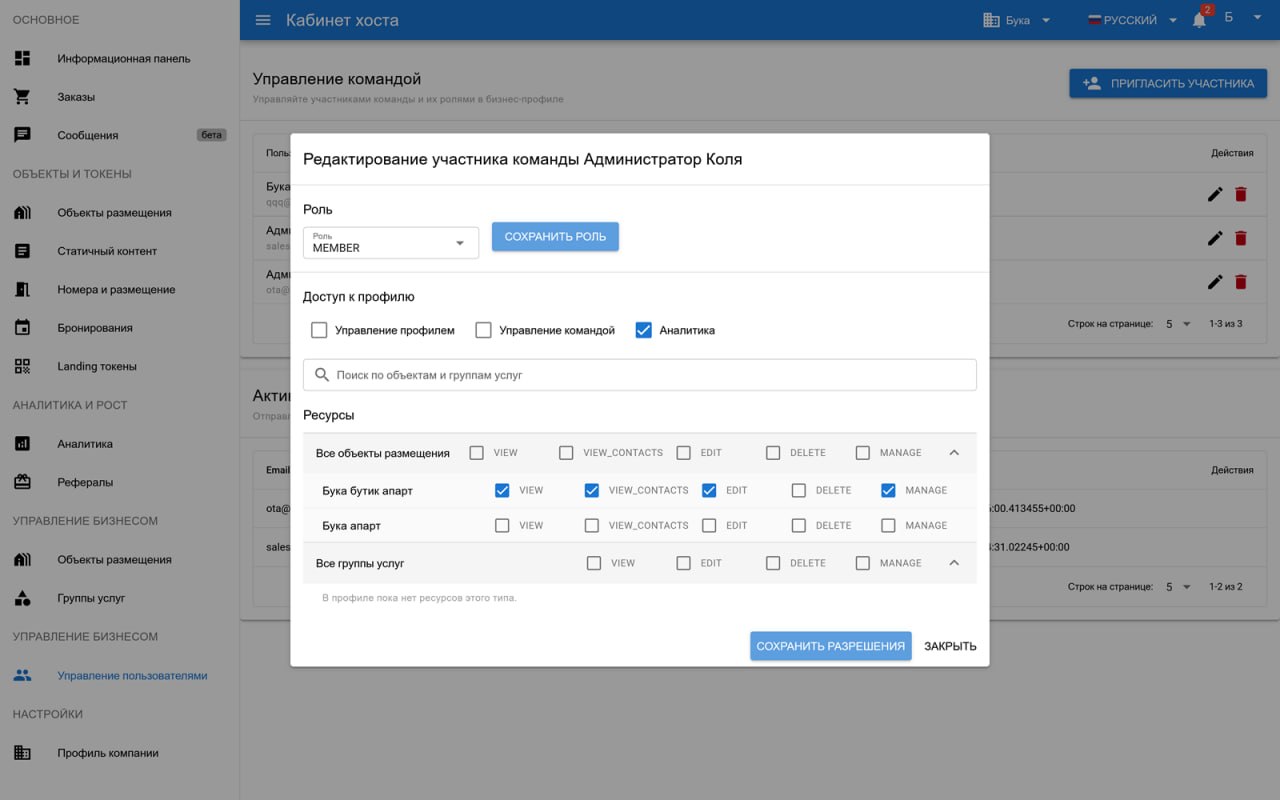
If you have several properties or a manager, access can be separated. The profile administrator decides who edits apartment information, who works with QR codes, who manages external services and who only views data.

This keeps the owner profile under control, while assistants receive only the access they need for their work.

This is especially useful for property management companies, owners of several apartments and properties where different people handle check-in, content, cleaning or guest communication.

Roles and access

Analytics

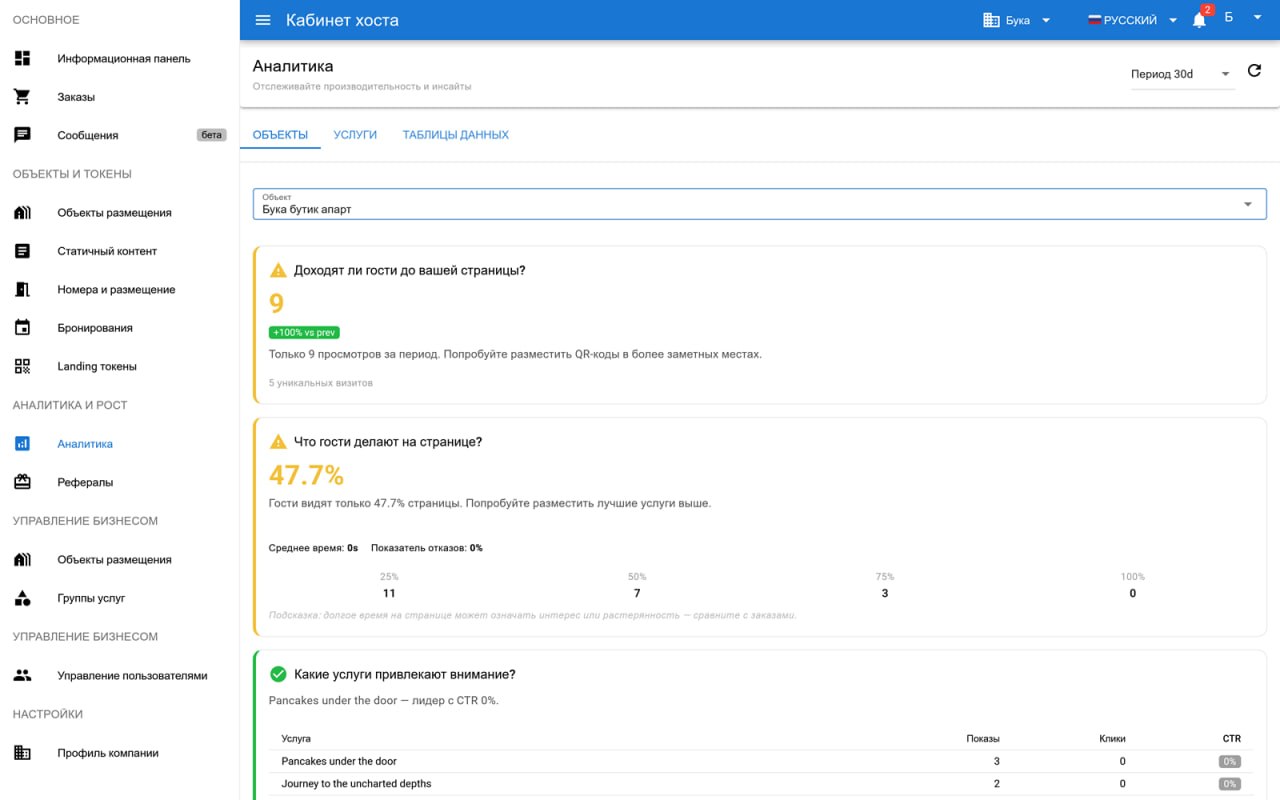
Analytics shows what actually works on the apartment page. You can see QR-code visits, guest devices, views of text blocks and services, popular offers and the times when orders most often appear.

These data points help you make practical decisions: where to place the QR code, which information blocks guests open most often, which nearby places truly interest them and which services should be shown more prominently.

For example, if guests often open the beaches section, you can describe routes in more detail and add timing recommendations. If almost nobody scans the QR code near the entrance, it can be moved to a more visible place. If transfers or tours consistently interest guests, similar offers can be added nearby.

As a result, the platform becomes not only a page with instructions, but also a guest experience management tool: it shows what guests actually read, choose and order.

Analytics